Finance Analyst Process Flow
Overview
Finance Analyst empowers business professionals to explore and visualize their OneStream cube data effortlessly using natural language. By simply asking questions—just as they would with a human analyst—users can instantly generate insights within the familiar OneStream Cube View and Quick View interfaces. This streamlines data exploration, making insights more accessible without requiring deep technical expertise.
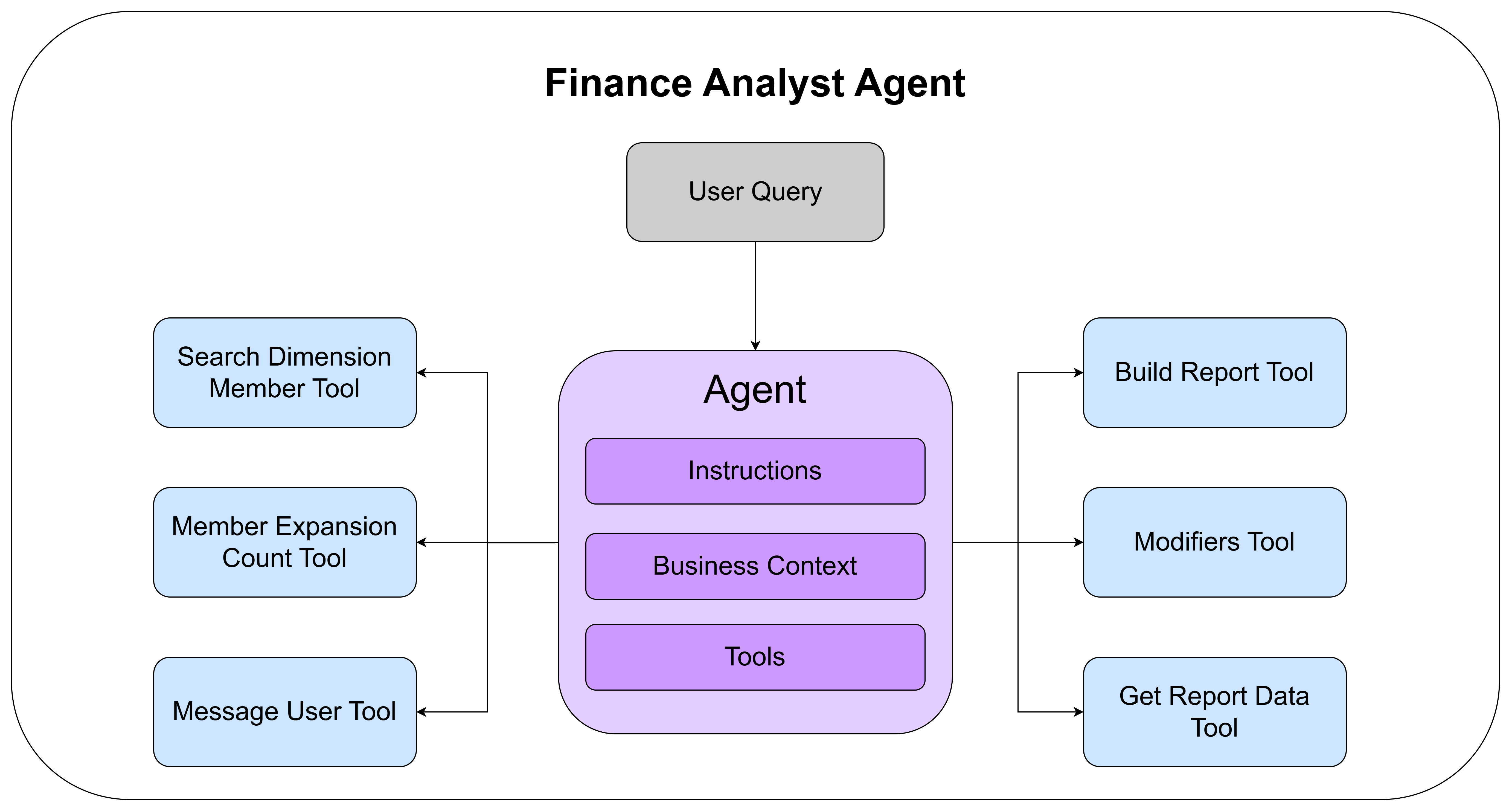
Our agentic framework enables Finance Analyst to interpret a wide range of natural language questions about cube data with high accuracy. At its core is an advanced reasoning model that dynamically selects and executes the right analytical tools, such as searching dimension members, resolving time periods, or structuring the report, based on user intent. This tool-based orchestration follows the best practices established by modern AI systems like Cursor, Codex, and Claude Code, while extending them with domain-specific intelligence for financial analysis. The result is a more adaptive and reliable system that delivers expert-level data retrieval without requiring technical expertise.
Beyond the general intelligence and reasoning capabilities, Finance Analyst can be enriched with both business context and application-specific knowledge directly within the agent. This allows organizations to encode the logic, assumptions, and decision patterns that typically reside in an analyst’s head. These contextual layers can be tailored for each business down to specific personas, enabling the agent to respond with insights that reflect specific definitions, reporting structures, and decisions. Context can include updated descriptions of dimension members, descriptions of what user defined dimensions and cubes represent, and broader business rules that shape how queries are interpreted. By embedding this information directly into the reasoning process, the agent adapts its behavior to reflect custom logic and organizational context, ensuring that every response aligns with how the business actually operates.
As the AI landscape continues to evolve, Finance Analyst is built to evolve with it. Its flexible, agent-based architecture allows the system to quickly adopt advancements in reasoning models, tool capabilities, and the broader AI ecosystem. This design ensures that Finance Analyst remains adaptable and future-ready, able to leverage new innovations without disruption. Over time this foundation will allow us to extend our agent with additional tools and functionality to support finance users in their everyday work.
Search Dimension Members Tool
This tool allows the agent to identify which dimension members are available to a specific user within the active application and cube. It is often the agent’s first step in processing a query, ensuring that all subsequent actions operate with proper understanding of the relevant metadata for a given user query. The tool performs a hybrid search that combines BM25 keyword ranking with vector similarity search across both member names and descriptions, returning the most relevant matches even when user phrasing differs from exact member labels. Because the search respects each user’s permissions, the agent can only retrieve and reason over data that the user is authorized to access, ensuring both precision and compliance in every interaction.
Get Member Expansion Count Tool
When building a report, the agent often needs to expand a dimension member to show its children or descendants. The Get Member Expansion Count tool allows the agent to check how many members a given expansion would return before committing to it. This prevents the agent from accidentally generating oversized reports that would be difficult for users to interpret, or from selecting an expansion level that returns too few or too many rows.
For example, if a user asks for "a breakdown of revenue by entity," the agent can check whether expanding an entity's children returns 5 members or 500 before deciding on the appropriate level of detail to include in the report.
Message User Tool
The Message User Tool allows the agent to engage directly with the user when additional clarification or context is needed. It plays a critical role in managing ambiguity and vagueness that naturally arise in complex financial queries, enabling the agent to ask follow-up questions, confirm assumptions, or explain how certain metadata or dimensions are being interpreted. Beyond resolving uncertainty, this tool also serves as the agent’s mechanism for delivering responses, insights, and explanations back to the user, creating a transparent, conversational loop that keeps the user in control of the analytical process. By facilitating this two-way communication, the tool ensures that outputs remain accurate, relevant, and aligned with the user’s intent and organizational context.
Build Report Tool
The Build Report Toolserves as the final stage in the agent’s workflow, transforming the selected dimension members and contextual information into a complete and valid OneStream report. It begins by validating all chosen members to check for any hallucinations, invalid intersections, or access related inconsistencies, ensuring the output aligns with the user’s permissions and application context. If validation fails, the errors will be passed back to the agent to be addressed before attempting to build the report again. The tool then determines the most appropriate layout, including rows, columns, and expansions, based on the user’s intent and business logic. Finally, it applies system level defaults to any dimensions not explicitly selected by the agent, resulting in a fully resolved and accurate report that reflects both user intent and organizational structure.
Modifiers Tool
The Modifiers tool applies sorting and filtering operations to a report that has already been built. It is invoked after the Build Report tool when the user's question involves ranking, ordering, or narrowing down results.
Common modifier operations include sorting data (e.g., "show top 10 accounts by revenue," "sort entities descending by spend"), filtering by thresholds (e.g., "only show accounts greater than $1M"), and limiting result sets. By separating modifiers from report construction, the agent can first build an accurate base report and then layer on the analytical operations the user requested.
Get Report Data Tool
The Get Report Data tool retrieves the actual data values from a finalized report after all modifier operations have been applied. This allows the agent to inspect the report results and use them to generate narrative explanations or answer follow-up questions about the data. It is the bridge between the structured report output and the agent's ability to reason about and describe the numbers it has retrieved.
Summary
Finance Analyst combines advanced reasoning with a modular tool framework to deliver a conversational, context-aware experience for exploring OneStream cube data. By integrating tools that search available members, resolve fiscal time periods, clarify ambiguity, and build validated reports, the system transforms complex analysis into an intuitive dialogue. Each interaction is guided by the user’s intent, permissions, and business context, ensuring every result is both accurate and relevant. This approach removes technical barriers to data access, enabling finance professionals to independently generate insights and focus on interpretation rather than data retrieval. As a result, Finance Analyst not only streamlines decision-making but also elevates the strategic value of financial data across the enterprise.