Deep Analysis Process Flow
Overview
Deep Analysis automates document processing at scale and answers truly exhaustive questions—those that require reading every document end-to-end to avoid gaps. For example, “List every contract that includes an NDA clause” can’t rely on a single explicit reference; missing one contract means the result is wrong. Unlike a quick search that looks for mentions, Deep Analysis systematically reads all files, makes multiple passes, and assembles a complete, defensible answer.
To do this, Deep Analysis uses a small set of coordinated operators:
- Extract / Parallel Extract — Pull key details from text, tables, and figures and append structured fields.
- Filter — Remove documents or chunks that don’t meet criteria.
- Resolve — Normalize different names/values that refer to the same entity.
- Separate — Split documents into logical pieces by keys (e.g., section, entity, time).
- Aggregate — Group by key combinations and summarize outcomes.
- Comparison — Evaluate extracted fields against external reference documents or knowledge clusters and add the result as a new field.
The system runs in two stages that can be used independently:
- Planning Agent — Gathers context, proposes an initial plan, and refines it with user feedback (with optional test runs on a small sample).
- Plan Execution Agent — Executes the validated plan, orchestrating operators in sequence to produce structured results.
Because documents may pass through multiple operators, Deep Analysis is designed for completeness over speed. Depending on corpus size and complexity, a fully accurate result can take several minutes.
The following sections detail each stage and show how the components work together to solve problems traditional search methods miss.
Planning Agent
The Planning Agent establishes the foundation for Deep Analysis by designing a structured plan before any processing begins. Because these analyses can be complex and resource-intensive, careful planning ensures alignment with user objectives and efficient use of system resources.
The planning framework follows a three-step process:
loading...- Context Gathering: The system reviews the user’s initial request, identifies assumptions about the data and documents, and asks clarifying questions to refine context. Users can confirm or correct these assumptions to ensure accuracy from the start.
- Plan Generation and Testing: Next, the system creates an initial plan detailing each operator and its role. Users can provide feedback, make adjustments, and test the plan on a small document sample to preview expected results.
This planning process guarantees that every analysis begins with a clear, validated roadmap—resulting in consistent, reliable, and accurate outcomes.
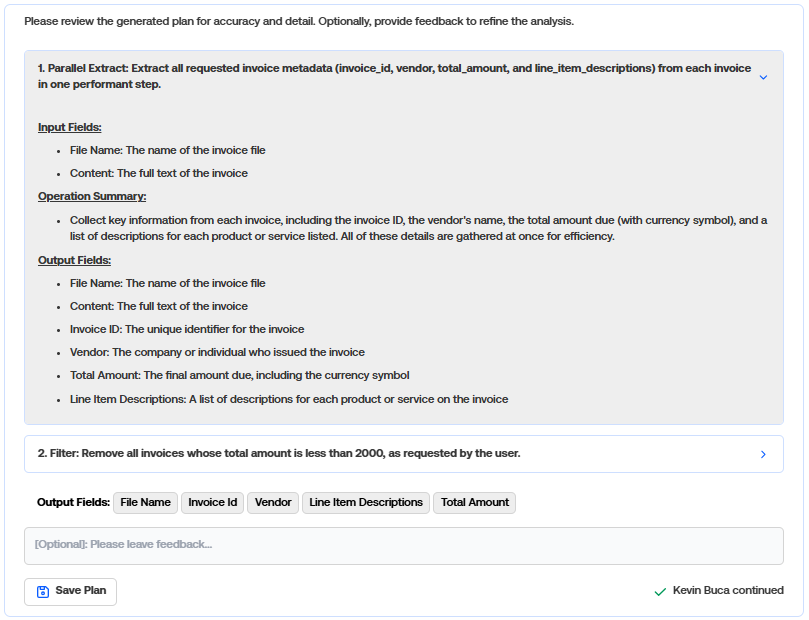
The following is an example of what a generated plan looks like:
Metaprompting
Deep Analysis uses a metaprompting architecture in which a higher-order model (the Planning Agent) generates the schemas and instructions that guide lower-level sub-agents (the operators). Rather than executing a task directly, the planner first reasons about howthe task should be performed and produces detailed, context-specific prompts that drive execution.
When a user describes an analysis—such as “Identify all customers from the contracts that receive discount policies”—the planner interprets the request, analyzes the data context, and outputs two key components:
-
Operator Instructions
Using the schema, the planner generates tailored prompts for each operator.- Extract might be instructed to locate all cost-related clauses and normalize values into the schema.
- Filter might retain only contracts containing discount policies.
- Aggregate might group results by customer.
-
Operator Execution Schemas
Each operator in the Deep Analysis pipeline is guided by its own execution schema, which defines the specific information that operator is responsible for producing and how that information should be structured. For example, an Extract operator may output fields like Customer Name, Contract ID, and Discount Terms. These tailored schemas ensure that every stage of processing produces clear, consistent, and machine-readable outputs that flow seamlessly into the next operator.
Each operator runs independently but follows the logic and structure defined by the metaprompt, allowing Deep Analysis to adapt dynamically to different document types and analytical goals.
In essence, the metaprompt acts as a prompt generator for downstream processes—designing both what data to capture and how each operator should process it. This layered prompting strategy gives Deep Analysis the flexibility to reason, plan, and execute complex document analyses with precision and consistency.
Plan Execution Agent
Once the plan is finalized, the Plan Execution Agent carries out the analysis. Each input document is first converted into a structured set of fields, known as state files, which provide a consistent format for processing across operators.
Using the validated plan, the agent constructs a network of operators and runs each document through them in sequence. As the operators execute, they progressively refine and transform the data—extracting key details, applying filters, and aggregating results—to produce the final, structured output.
Extract/Parallel Extract:
This operator is designed to pull out, or “extract”, key pieces of information from each document. Instead of searching through the document content repeatedly for the same details, the operator extracts the required data once and adds it to each state file. For example, if a user is interested in a company name from a win announcement, the operator will scan the document once, extract the company name, and store it under a designated field like “company_name.” This way, subsequent operators can easily access that information without having to re-read the entire document.
Before
{
    "file_name": "win_announcement",
    "content": "The company 'FictionalCompany' has just purchased OneStream! They said ..."
},
-------------------------------------------------------------------------------
After
{
    "file_name": "win_announcement",
    "content": "The company 'FictionalCompany' has just purchased OneStream! They said ..."
    "company_name": "FictionalCompany"
},
Filter:
This operator removes documents that are not needed for subsequent steps. It uses a filter prompt to examine specific fields in each state file and decide which documents meet the specified criteria (pass) and which do not (fail). Only documents that pass the filter condition remain in the output.
For example, if the filter was told to only allow documents relating to shoe brands that purchased OneStream:
Before
{
    "file_name": "win_announcement",
    "content": "The company 'ShoeWorld' has just purchased OneStream! They said ..."
},
{
    "file_name": "win_announcement2",
    "content": "The company 'TableWorld' has just purchased OneStream! They said ..."
},
-------------------------------------------------------------------------------
After
{
    "file_name": "win_announcement",
    "content": "The company 'ShoeWorld' has just purchased OneStream! They said ..."
},
Separate:
Often referred to as “exploding” or “flattening,” this operator takes a document containing a list of values under a specific key and splits it into multiple documents. Each new document retains all the other fields from the original but replaces the chosen key with exactly one item from the list. This helps create distinct entries for each value, making further comparisons or processing simpler.
For example, if the separate key was purchase_reasons:
Before
{
    "file_name": "win_announcement",
    "content": "The company 'FictionalCompany' has just purchased OneStream! They said ..."
    "purchase_reasons": ["Easy to use", "Powerful"]
},

-------------------------------------------------------------------------------
After
{
    "file_name": "win_announcement",
    "content": "The company 'FictionalCompany' has just purchased OneStream! They said ..."
    "purchase_reasons": "Easy to use"
},
{
    "file_name": "win_announcement",
    "content": "The company 'FictionalCompany' has just purchased OneStream! They said ..."
    "purchase_reasons": "Powerful"
},
Resolve:
This operator standardizes values or names to ensure they match consistently for downstream comparisons or aggregation. It’s especially important when the same entity might be mentioned in different ways (e.g., variations in spelling, abbreviations, or product names). By unifying these references into a single canonical form, the system can accurately recognize them as referring to the same entity.
For example, if we were trying to resolve the product replaced for the documents below:
Before
{
    "company_name": "Acme Corp",
    "product_replaced": "DownStream"
},
{
    "company_name": "Beta Inc",
    "product_replaced": "DownStream Inc."
}
---------------------------------------------------------------------------------
After
{
    "company_name": "Acme Corp",
    "product_replaced": "DownStream"
},
{
    "company_name": "Beta Inc",
    "product_replaced": "DownStream"
}
Aggregate:
This operator groups documents based on unique values in one or more “aggregate keys,” then applies a specified prompt or process to each group. It’s useful for generating summaries, metrics, or insights about documents that are similar
For example, if the aggregate key was products_replaced, and the prompt was “combine info about each product replaced across all documents”:
Before
{
    "company_name": "Acme Corp",
    "products_replaced": "DownStream",
},
{
    "company_name": "Beta Inc.",
    "products_replaced": "DownStream",
},
{
    "company_name": "Gamma Corp.",
    "products_replaced": "UpStream",
}

Grouped by aggregate_key = "products_replaced", we'll have:
      Group 1: DownStream-related documents
      Group 2: UpStream-related documents
---------------------------------------------------------------------------------
After
{
    "products_replaced": "DownStream",
    "aggregated_summary": "Companies that replaced DownStream include Acme Corp., Beta Inc..."
},
{
    "products_replaced": "UpStream",
    "aggregated_summary": "Company that replaced Oracle ERP was Gamma Corp..."
}
Comparison:
This operator evaluates extracted data from prior operators against external reference documentation and adds a comparison result to each document. The user selects reference material at runtime — either by uploading documents directly or by choosing existing knowledge clusters from their indexed corpus. For each document, the operator takes specific fields (the comparison keys) and compares them against the reference content using a tailored comparison prompt. The result — such as a compliance assessment, classification, or guided recommendation — is stored in a new output field on each document. Because comparison depends on previously extracted data, this operator always runs after the extraction operators that produce the fields it evaluates.
For example, if the comparison key was discount_policy and the reference material was a regulatory pricing guideline:
Before
{
    "file_name": "contract_acme",
    "content": "Acme Corp is eligible for a 15% volume discount on orders over ...",
    "discount_policy": "15% volume discount on orders exceeding 500 units"
},
{
    "file_name": "contract_beta",
    "content": "Beta Inc receives a 5% loyalty discount applied after ...",
    "discount_policy": "5% loyalty discount applied after 12 months"
},
-------------------------------------------------------------------------------
After
{
    "file_name": "contract_acme",
    "content": "Acme Corp is eligible for a 15% volume discount on orders over ...",
    "discount_policy": "15% volume discount on orders exceeding 500 units",
    "compliance_assessment": "Compliant. The 15% volume discount aligns with Section 4.2 of the pricing guidelines, which permits volume-based discounts up to 20%."
},
{
    "file_name": "contract_beta",
    "content": "Beta Inc receives a 5% loyalty discount applied after ...",
    "discount_policy": "5% loyalty discount applied after 12 months",
    "compliance_assessment": "Non-compliant. Loyalty discounts require a minimum tenure of 24 months per Section 3.1 of the pricing guidelines; this contract applies the discount after only 12 months."
},
Deep Analysis Output
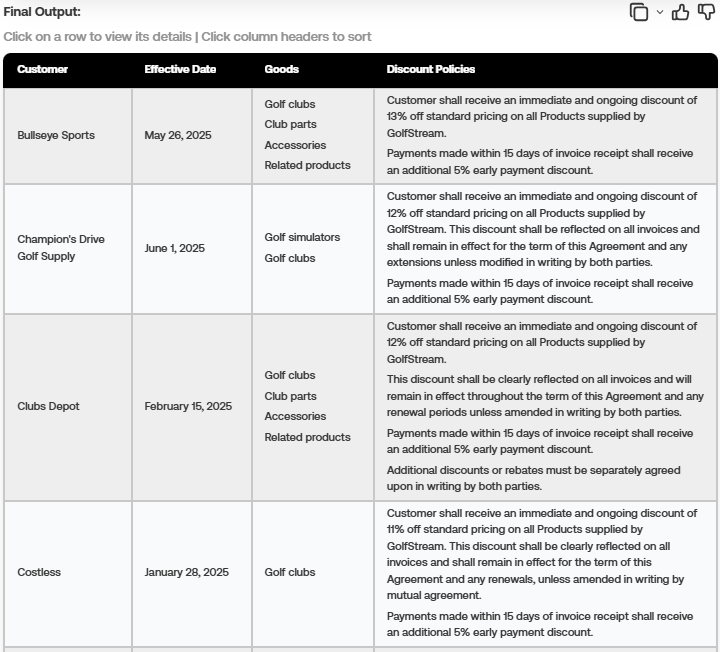
A key value of Deep Analysis is its ability to transform unstructured information into structured, actionable data. Instead of returning raw text from thousands of documents, the system organizes results into a clear, tabular format that highlights key data fields and relationships. This makes it easy for users to review findings, compare values, and identify insights at a glance.
The structured output can be seamlessly exported to external tools for further analysis or reporting, enabling smooth integration with existing workflows.
Prompt: Give me a table of the customer in each contract, the effective date of the contract, the goods that are mentioned, and identify any policies related to discounts from the contracts. Show me only the contracts with discount policies.
Summary
Deep Analysis is built to automate the processing of documents at scale, with the ability to handle complex, exhaustive analyses with precision. The system consists of a thorough planning phase where context is gathered, a detailed plan is generated, and every step is validated to ensure accuracy. Once the plan is created and approved, the system breaks down documents into structured state files and processes them using a suite of operators that are customized to the analysis instructions—including extract, filter, resolve, separate, aggregate, and comparison—to systematically pull, standardize, and group key information. The final insights are presented in a clear, structured table that not only supports immediate analysis but also can be exported for future use. Ultimately, Deep Analysis transforms vast amounts of raw, unstructured data into actionable insights, empowering users to make informed decisions with confidence.