XPFv4.0.2 Release Notes
Release Date
Release Overview
-
Architecture Enhancements
- Web Service process updates to improve REST API speed and efficiency
-
SensibleAI Forecast
-
Prediction Summary web dashboard bug fixes and enhancements
-
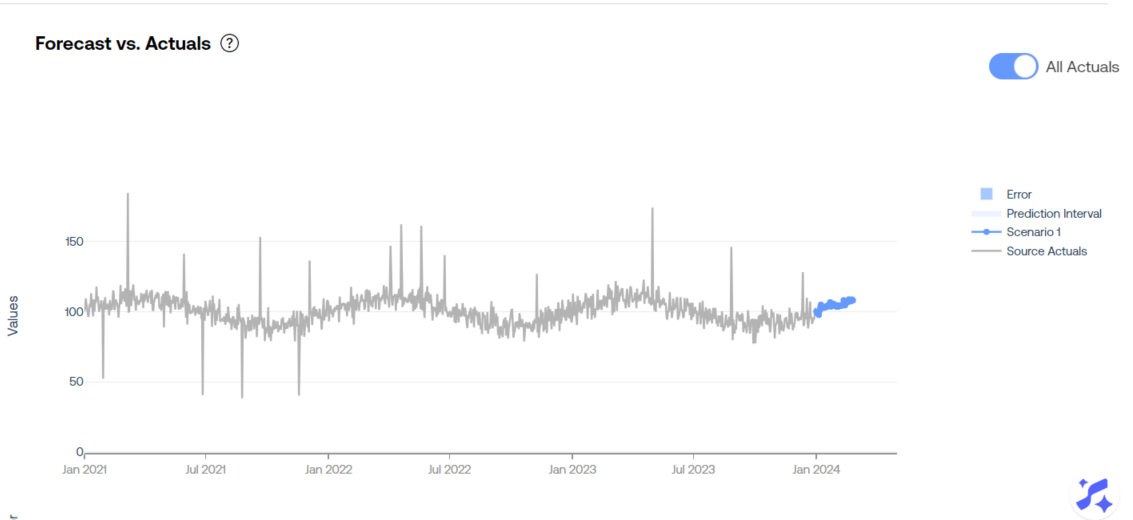
Prediction Summary web dashboard Forecast page now allows users to view all prior actuals
-
Fix feature shortnames for grouped and overlays models, changing the previously long, unreadable names into short, descriptive ones.
-
Various other minor UI enhancements including better tooltips, improved scroll functionality, the ability to click the GenAI narrative button while it’s open to close it, improved query parameterization support for deployable dashboards, the inclusion of the target name in the web dashboard
-
-
Miscellaneous bug fixes from 4.0.1
- Speed up prediction times for grouped + overlays projects
- Feature Generalization Webapp no longer broken for grouped + overlays projects
- Allow feature dataset updates if pipeline failed with syserror rerunnable to ensure necessary updates can be made if too many features caused the pipeline to fail
-
SensibleAI Studio
-
MLClassifierV2
-
A V2 version of the MLClassifier routine was released. This version comes with the addition of the following enhancements
-
Probability Win %
- This will add onto the predictionoutput the probability that a given class was assigned. To ensure that your classification model produces these values, set the new raw_scores parameter equal to True
-
-
Dependencies
Requires OneStream 9.x to be installed prior to use.
Known Issues
-
Web App Login Refresh
- On Platform < v9.0.3, If users are in an environment for longer than one hour, they will be prompted to login to view any and all webapps every time they enter a new page. There is a OneStream Platform hotfix in progress to address this; however, we have a temporary workaround for this. If you are upgrading to v4.0.0+, please contact OneStream AI Support for details on how to get this workaround put in place.
-
Shifting targets/removing them from the Target Source Data
- Removing targets on a project will cause issues with a time export for a Deployed Model Forecast consumption group. If we remove the target from the source data, there will be no actuals for the deleted target causing Field not found errors when exporting. In order to work around this issue, users can add the source data back into the target data, run the consumption group export, then remove the target from the source data again.
-
Cannot leverage SQL
DATEdtype for the date column of target datasets- To work around this, we advise all target and feature datasets stored in SQL to use the
DATETIMEdatatype.
- To work around this, we advise all target and feature datasets stored in SQL to use the
-
Improper Model Time Estimations when disabling
CatBoostModelMultiRegressionTime,XGBoostModelMultiRegressionTime,ElasticNetMultiRegressionTime,CubistModelMultiRegressionTime,RandomForestRegressionTimeSeries,CatBoostModelRegressionTimeSeries,XGBoostModelRegressionTimeSeries,PolyElasticNetModel,CubistModelRegressionTimeSeries- To work around this, please do not disable these models using custom model thresholds
-
Race condition that can cause jobs to immediately fail with “No entrypoint exists for job id: X”, this is a very rare bug that should not persist on retry. This is fixed in 4.3.
Upgrade Guide
If coming from a version prior to XPFv4.0.0, refer to the XPFv4.0.0 Release Notes:
Compatibility Guide
Link to Compatibility Guide